Gallery
What is BYOM?
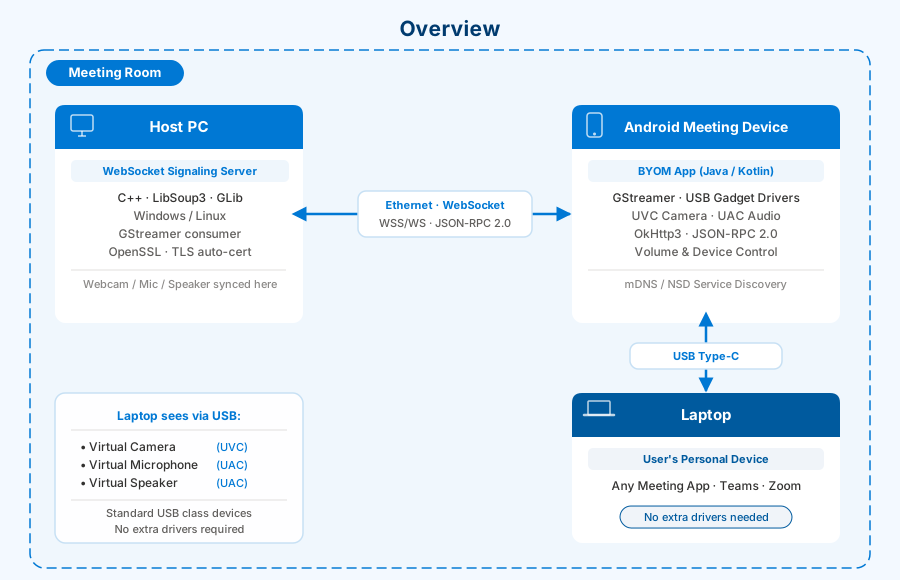
BYOM (Bring Your Own Meeting) lets a user’s personal laptop seamlessly take over a meeting room’s audio/video peripherals - camera, microphone, and speaker - without installing any special drivers. The laptop sees the room’s devices as standard USB peripherals and uses them directly in any meeting application (Teams, Zoom, etc.).
System Topology
The system is built on three nodes that communicate over USB and Ethernet:
| Node | Hardware | Software | Role |
|---|---|---|---|
| Host PC | Standard PC/server | WebSocket signaling server (C++) + room apps | Signaling hub; streams room AV to Android |
| Android Device | Meeting bar/console | BYOM app + GStreamer | Bridge: orchestrates USB gadget virtualization, streams AV, controls volume/devices |
| Laptop | User’s personal laptop | Any meeting app | Consumes virtual USB peripherals, no extra drivers required |
Data Flows
Audio/Video Streaming
The Android device acts as a USB Device towards the laptop. The laptop’s OS sees three standard USB class devices:
- UVC (USB Video Class) - virtual webcam carrying the laptop’s camera feed
- UAC (USB Audio Class) - virtual microphone + speaker
Audio/video captured on the laptop travels over USB Type-C to the Android device, then via RTSP/RTSPS over LAN to the Host PC, where it is displayed and played in the meeting room.
Signaling and Control
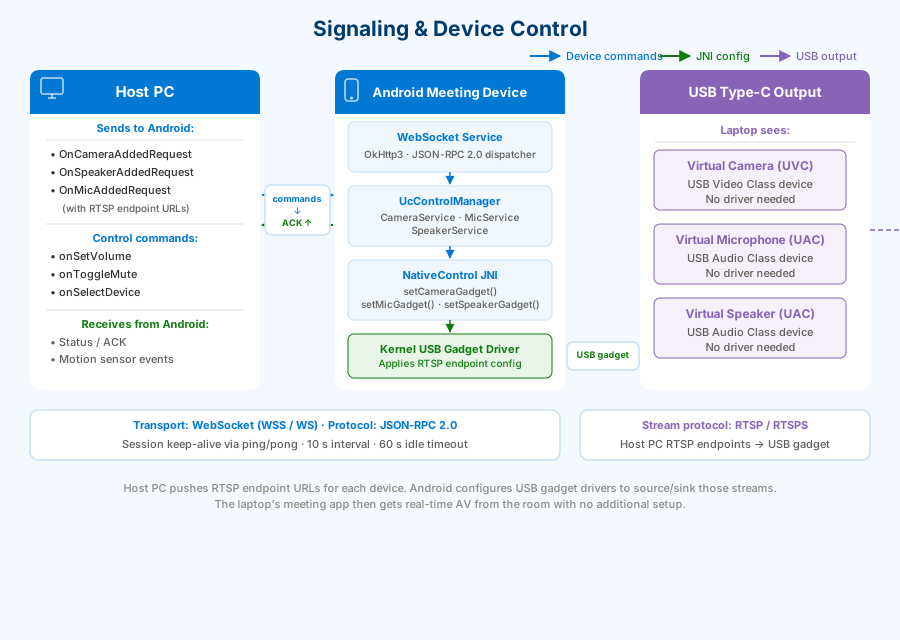
The Host PC pushes RTSP endpoint URLs for each device over a WebSocket JSON-RPC connection. The Android device configures its USB gadget drivers to source/sink those streams. From that point on, the laptop’s meeting app gets real-time AV from the room.
Room Display
The Android device also acts as a display console: the Host PC sets an RTSP stream URL via SetConsoleContentSourceRequest, GStreamer decodes and renders the video to the Android screen, and touch events are forwarded back to the Host PC.
Key Subsystems
WebSocket Signaling Server (Host PC)
- C++17 application built on LibSoup3 + GLib
- Supports both secure (WSS/TLS) and plain (WS) modes
- Self-signed TLS certificate (RSA-2048, SAN with host IP) auto-generated at startup
- Session keep-alive via ping/pong - 10-second interval, 60-second idle timeout
- Cross-platform: single codebase for Windows and Linux
BYOM App (Android)
- OkHttp3 WebSocket client with JSON-RPC 2.0 protocol
- Background WebSocket service manages concurrent connections with auto-reconnect and Kotlin Flow–based status propagation
- mDNS/NSD service discovery for zero-config room pairing
Device Virtualization Layer
UcControlManagersingleton coordinates three device services: Camera, Mic, Speaker- Each service has a Remote Backend (devices advertised by Host PC) and a Local Backend (Android hardware)
NativeControlJNI interface applies gadget configurations to Linux kernel USB gadget drivers- Volume and mute state kept in-sync between Host PC and Android in real time
GStreamer Integration
- Native libraries (
libgstreamer_android.so, etc.) bridged via JNI - Receives RTSP/RTSPS URLs from Host PC; decodes and renders video/audio
- JNI surface lifecycle management for Android
Human Presence Detection (Optional)
- Android polls HPD sensor node every 5 seconds
- Presence events forwarded to Host PC as motion sensor events via WebSocket
Security
| Aspect | Mechanism |
|---|---|
| Transport | WSS (TLS 1.2+) with auto-generated RSA-2048 self-signed certificate |
| Certificate | SAN includes host IP and hostname |
| Admin access | SHA-256 password hash; controls broadcast/shutdown/disconnect |
| Client auth | None for regular sessions (suitable for trusted LAN) |